It has happened to all of us: you copy something — a phone number, a snippet of code, an address — and right before you paste it, you copy something else. And the first thing is... gone. You go back to that page, search, find it, copy it again. How many times a day do we do this? I stopped counting long ago.
For a long time I just accepted it as "well, that's how it is." Then one day, copying the same thing for the third time in a row, I stopped and told myself, "wait, I could actually fix this." Clipory was born right there, out of that tiny frustration.
It really does something very simple
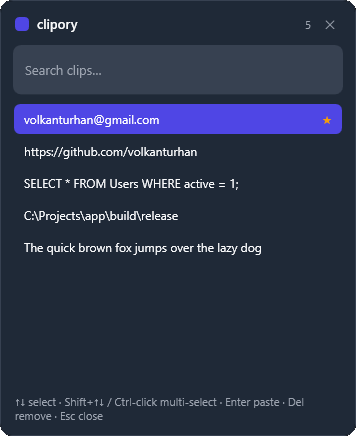
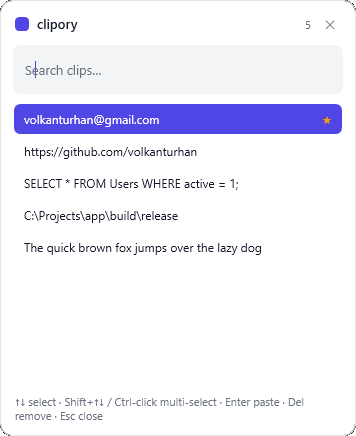
It sits quietly in your system tray and remembers things as you copy them. When you need one, you press Ctrl + Shift + V; a little list opens right on top of whatever app you're in. You search by typing, move with the arrow keys, press Enter — and the clip you picked is pasted straight into that app. No switching windows, no going back, no "where was that again."
You can pin the ones you use often; favourites stay on top and are never dropped. When things pile up, select several clips (Ctrl-click or Shift) and delete them in one go. Even after you shut the machine down and back on, your history is right where you left it. It can start with Windows if you like.
There are a few details I'm fond of: a dark mode — pick System / Dark / Light from the tray, and it follows Windows by default. You can switch the interface between English and Turkish. I added a small close button to the popup. And my favourite part: Clipory now updates itself — when a new version ships, it offers it from the tray and installs it in one click.
Everything stays on your machine
This is the part I care about most: none of your clips go to the cloud, nothing is uploaded to a server, nothing even says "hello" anywhere. Your history lives only on your own computer, in a simple file (%APPDATA%\clipory\history.json). Because the clipboard sometimes carries the most private things — a password, a personal message, a client's details. I felt those should be nobody's business but yours.
You can download it now
When I first wrote this, there was no shareable file — it only ran from source. Now there are ready-made downloads. From the Releases page you can grab either:
- Download the installer (recommended) —
clipory-setup-v1.0.0.exe. No admin rights needed, and it keeps itself up to date from there on. - Download the portable build —
clipory-v1.0.0.exe. A single file; just run it, nothing to install.
Both are self-contained, so you don't need .NET installed. Windows 10/11, 64-bit. The current version as I write this is v1.0.0.
And the building side
I want to share this too, because honestly it's something I'm proud of: I wrote Clipory in C# and WPF on .NET 8, without a single third-party dependency. Catching the global hotkey, bringing the popup over the right window, then handing focus back to the previous app and triggering the paste… It sounds small, but each one was its own puzzle, and solving them one by one was incredibly satisfying. Dark mode, language switching and self-updating were added the same way — from scratch, no outside packages. What came out is light, fast and gets out of your way.
Clipory is open source (MIT) and free. The code is fully open; if you like, you can read it, run it, and build your own copy.
If you, like me, sometimes get annoyed at yourself with "wait, what did I just copy," I'd say give it a try. Maybe it'll ease your mind a few times a day too.
Code and downloads are here: github.com/volkanturhan/clipory — if you try it, I'd genuinely love to hear what you think. 🙂
⬇️ Download Clipory directly — Windows 64-bit installer (v1.0.0)